Вышла новая англоязычная книга "OpenGL 4.0 Shading Language Cookbook", которая по сути является гидом, проводящим читателя от основ методов программирования на GLSL 4.0 и OpenGL 4.0 до реализации более передовых методов и шейдер-эффектов затенения, освещения, тесселяции, геометрии и т.д.
Книга является практическим пособием, она наполнена примерами, готовыми к осуществлению. Она будет полезна в первую очередь опытным программистам 3D-графики.
Данная книга распространяется как в бумажном варианте, так и в электронном (формат PDF). Бумажная версия книги стоит $44.99, электронная версия - $25.49. Узнать подробности и приобрести "OpenGL 4.0 Shading Language Cookbook" можно тут.
Также если вы считаете, что данный материал мог быть интересен и полезен кому-то из ваших друзей, то вы бы могли посоветовать его, отправив сообщение на e-mail друга:
Игровые объявления и предложения:
Если вас заинтересовал материал «OpenGL 4.0 Shading Language Cookbook», и вы бы хотели прочесть что-то на эту же тему, то вы можете воспользоваться списком схожих материалов ниже. Данный список сформирован автоматически по тематическим меткам раздела.
Предлагаются такие схожие материалы:
Если вы ведёте свой блог, микроблог, либо участвуете в какой-то популярной социальной сети, то вы можете быстро поделиться данной заметкой со своими друзьями и посетителями.


 17:33
17:33 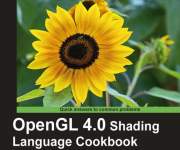 Вышла новая англоязычная книга "OpenGL 4.0 Shading Language Cookbook", которая по сути является гидом, проводящим читателя от основ методов программирования на GLSL 4.0 и OpenGL 4.0 до реализации более передовых методов и шейдер-эффектов затенения, освещения, тесселяции, геометрии и т.д.
 3255
3255 

 Всего комментариев: 4
 2
2
 Не забываем скачивать код с оф-сайта (относится ко всем книгам издательства)!
 ну, это кук бук, основная цель такой "литературы" - собрать готовые примеры, с описанием но без разъяснения. Хотя может сейчас другие кук буки пошли.
